
VIN Information Lookup
For U.S. market vehicles only —
This free VIN decoder tool uses data from the U.S. National Highway Traffic Safety Administration (NHTSA). Information may be limited for vehicles built for other markets.
What this VIN tool does
Allows you to easily explore enhanced manufacturer-submitted vehicle information from the NHTSA, along with available safety ratings and the latest recall record for your vehicle.
This is a free VIN lookup service for U.S. vehicles and drivers. No account required. No login required.
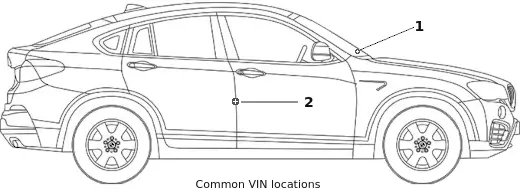
Where to find your VIN
On the dashboard, visible through the windshield ( 1 )
On a label or plate inside the door opening or on the door jamb ( 2 )
On vehicle registration or insurance documents
Why use XVEA’s VIN lookup?
- Free VIN decoding
- Explanation for each result
- See actual specs submitted by the manufacturer
- No login or account required
- Transparent NHTSA data sources
- Over 400,000 VIN lookups since 2020
Vehicle data sources
XVEA uses official vehicle data from the NHTSA, alongside VIN structure and check-digit calculations.
- NHTSA vehicle identification data
- NHTSA New Car Assessment Program (NCAP) safety ratings
- NHTSA vehicle recall data
- Supplementary vehicle data maintained by XVEA
- VIN structure and check-digit checks (as per ISO 3779)
XVEA VIN reporting version: 261020-0722
carVertical History Reports - we may receive a remuneration for referral sales to their advanced vehicle history reports.